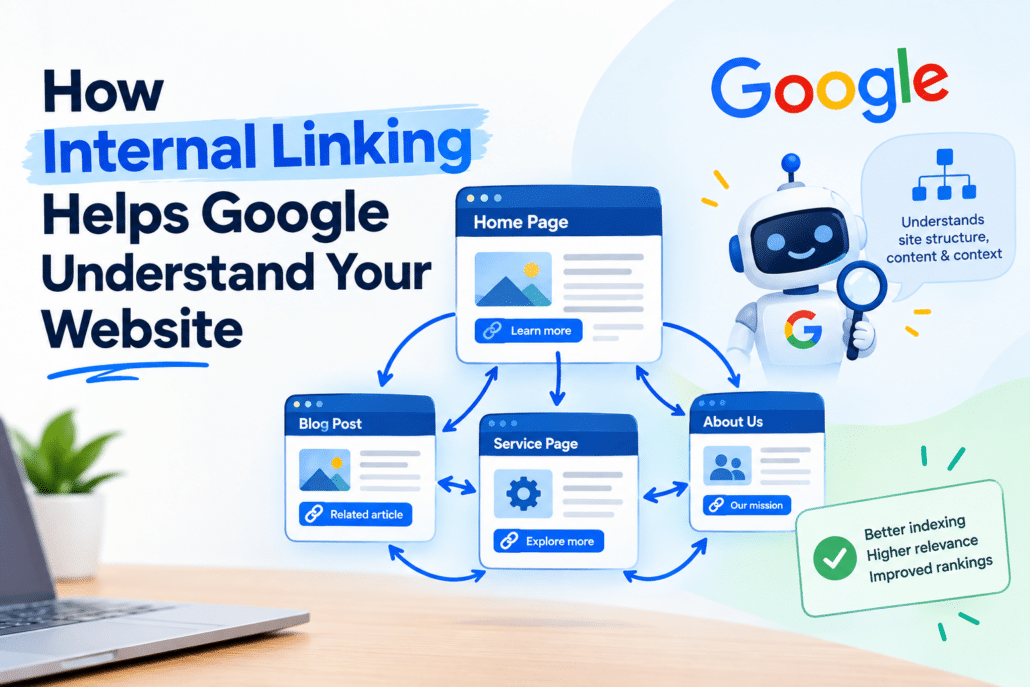
How Internal Linking Helps Google Understand Your Website
A successful website is more than a collection of individual pages. Your homepage, service pages, location pages, blog posts, case studies, and resources should work together to communicate a clear story about your business. For companies investing in search engine optimization in Philadelphia, creating those connections can be an important part of building a website that is easier for both visitors and search engines to understand.
One of the simplest ways to connect related pages is through internal linking. Internal links connect one page on your website to another page on the same domain. When used strategically, they can help visitors discover relevant information while providing search engines with additional context about the relationships between pages.
At Hyland Graphic Design & Advertising, we regularly see businesses create valuable content without connecting it strategically. A company may have excellent service pages and informative blog posts, yet those pages remain isolated from one another.
A thoughtful internal linking strategy can transform those disconnected pages into a more organized content ecosystem. It can help users navigate the site, highlight important pages, and provide search engines with additional clues about the site’s structure and topical relationships.
What Is Internal Linking?
Internal linking is the practice of linking one page on your website to another relevant page on the same website.
For example, a blog about professional branding could naturally link to a branding service page. An article about website performance could link to a related page explaining technical SEO. A location page could reference a relevant service page when that connection is useful to the visitor.
The important factor is relevance.
Internal links should help users find information they are likely to need next rather than being added simply to increase the number of links on a page.
A well-planned internal linking strategy can help:
- Guide visitors toward related information
- Make important pages easier to discover
- Establish relationships between related topics
- Create a clearer website structure
- Help search engines understand page relationships
- Support navigation between informational and commercial pages
- Encourage visitors to explore additional resources
The goal is not to add as many internal links as possible.
The goal is to create useful pathways through your website.
Why Internal Linking Matters for SEO
Search engines need to understand what individual pages are about and how those pages relate to the rest of the website.
Your site’s structure provides important context.
Imagine a website with 30 blog posts about web design, SEO, and digital marketing. If those articles are completely isolated, with few connections between related topics or important service pages, the site’s topical relationships may be less apparent.
Now imagine those same articles organized into logical groups, with relevant links connecting supporting content to core service pages and related resources.
The structure becomes easier for both users and search engines to follow.
This is why internal linking can be an important component of a broader search engine optimization Philadelphia strategy. Instead of treating every page as an independent piece of content, you create a connected resource where individual pages support one another.
How Internal Links Help Search Engines Understand Website Structure
Internal links provide additional pathways for search engines to discover and interpret pages.
A link can communicate several useful pieces of context:
- Which pages are related
- What topics your website covers
- Which pages are connected to important services
- How different pieces of content fit together
- Which pages may deserve additional attention within the site’s structure
Internal links do not guarantee higher rankings. However, a clear and logical site architecture can make it easier for search engines to crawl and understand a website.
This becomes especially important as websites grow.
A 10-page website may have a relatively simple structure. A website with hundreds of service pages, blog posts, location pages, and resources requires a much more deliberate approach.
What Many Businesses Get Wrong
One of the most common mistakes is relying almost entirely on the main navigation menu.
Navigation is important, but it should not be the only way visitors and search engines move through a website.
Context matters.
A link placed naturally within a paragraph can explain why two pages are connected.
For example:
Businesses looking to improve their online visibility can explore our search engine optimization services.
If the phrase is linked to a relevant service page, the visitor immediately understands what they will find after clicking.
That creates a useful connection between the information they are currently reading and a potential next step.
The same principle applies throughout the website.
Internal linking should support the visitor’s journey rather than interrupt it.
Internal Links Create a Connected Website
Think of your website as a network rather than a series of isolated pages.
Your homepage introduces your company.
Your service pages explain what you offer.
Your location pages establish geographic relevance.
Your blog answers customer questions.
Your case studies demonstrate experience.
Your resources provide deeper information.
Your contact page gives visitors a way to take action.
Internal linking connects these pieces.
When those relationships are intentional, visitors can move naturally from learning about a problem to discovering a potential solution and eventually taking action.
This creates a better user journey while giving search engines additional information about how the website is organized.
Building Topic Clusters With Internal Links
One effective approach to internal linking is organizing related content into topic clusters.
A topic cluster generally contains three elements.
1. A Primary Topic or Core Page
This may be a service page, category page, or another important page targeting a broad subject.
For example, a website might have a core page focused on SEO services.
2. Supporting Content
Supporting content consists of articles and resources that answer more specific questions related to the primary topic.
For an SEO-focused website, supporting articles might cover:
- Local SEO
- Technical SEO
- Keyword research
- On-page optimization
- Internal linking
- Search visibility
- Content optimization
- Google Business Profile optimization
3. Relevant Internal Connections
The supporting articles can link to the primary page and, where appropriate, to other related articles.
For example, an article about keyword research could reference a broader SEO service page. A technical SEO article could link to another resource about website performance.
The result is a connected topic ecosystem rather than a collection of unrelated blog posts.
How Internal Linking Helps Visitors
Internal linking is not only an SEO technique.
It can also improve the experience of the person reading your website.
Imagine someone reading an article about improving website performance. They encounter a term they do not fully understand, such as technical SEO.
Instead of leaving your website and searching somewhere else, they can follow a relevant internal link to an article explaining the concept.
That makes the content more useful while giving the visitor a reason to continue exploring your website.
A good internal linking question is:
“What would this visitor reasonably want to read next?”
If you can answer that question, you can often identify a valuable internal linking opportunity.
Choosing the Right Pages to Link
Not every page needs to receive the same number of internal links.
Start by identifying the pages that are most important to your business.
These may include:
- Core service pages
- Important location pages
- High-value product pages
- Lead-generation landing pages
- Key educational resources
- High-performing articles
- Strategic category pages
Then review your existing content to identify natural opportunities to reference those pages.
For example, suppose you have an older blog about website redesigns and recently published a detailed web design service page.
If the older article discusses the benefits of professional website design, it may provide a natural opportunity to link to the service page.
You do not necessarily need to create another article.
Sometimes the opportunity is already sitting inside your existing content.
Use Descriptive Anchor Text
The clickable words used for an internal link are called anchor text.
Effective anchor text gives readers an idea of what they will find after clicking.
Instead of repeatedly using generic phrases such as:
- Click here
- Learn more
- Read this
- More information
use descriptive wording that fits naturally within the sentence.
Less useful:
“Click here to learn more.”
More descriptive:
“Explore our website design services.”
The second example gives the reader more context.
However, there is no need to force an exact-match keyword into every internal link. Anchor text should remain natural, descriptive, and relevant to the page being linked.
Over-optimized or awkward anchor text can make content feel unnatural.
Internal Linking and Local SEO
Internal linking can also be useful for businesses targeting specific geographic markets.
A company serving Philadelphia, for example, may have service pages, location pages, and educational content focused on different aspects of its market.
Relevant connections between these pages can help organize the site’s local content.
For businesses researching a Philadelphia SEO expert, the same principle applies: local SEO is not simply about adding a city name to pages. The website should provide useful location-specific information while maintaining a logical structure between services, resources, and geographic pages.
Internal links can help connect those related pieces.
The links themselves are only one part of local SEO, but they can contribute to a more organized website architecture.
Don’t Forget Your Older Content
One of the easiest opportunities for improving internal linking is revisiting older blog posts.
Businesses often publish new content but forget about the hundreds or thousands of words already sitting on their websites.
A periodic content review can uncover opportunities to:
- Link older blogs to newer articles
- Connect informational content to service pages
- Link related blog posts together
- Add references to important resources
- Identify pages receiving few internal links
- Update outdated anchor text
- Strengthen connections between topic clusters
This approach allows existing content to continue supporting your broader SEO strategy.
At Hyland Graphic Design & Advertising, we believe a website should work as a connected marketing asset rather than a collection of isolated pages.
How to Identify Internal Linking Opportunities
You do not need to manually inspect every sentence on your website without a plan.
Start with your most important pages.
Step 1: Identify Priority Pages
Determine which pages are most valuable to your business.
These could include your primary services, high-value location pages, lead-generation pages, or important resources.
Step 2: Find Related Content
Search your existing website for articles and pages that discuss subjects related to those priority pages.
Step 3: Evaluate Context
Read the surrounding paragraph.
Ask whether a visitor would genuinely benefit from additional information at that point.
Step 4: Add a Relevant Link
Use descriptive anchor text that accurately reflects the destination page.
Step 5: Review the User Journey
After adding the link, consider where the visitor goes next.
Does the destination page answer the question raised by the original content?
If yes, the link is likely serving a useful purpose.
Common Internal Linking Mistakes
Adding Links Without Relevance
Not every page needs to link to every other page.
A link should have a logical relationship to the surrounding content.
Using the Same Anchor Text Everywhere
Repeatedly using exactly the same anchor text can make content feel forced.
Use natural variations when appropriate while keeping the destination clear.
Linking Only to the Homepage
Your homepage is important, but it should not receive every internal link.
Important service pages, resources, location pages, and supporting articles can also benefit from relevant internal connections.
Ignoring Orphan Pages
An orphan page is a page that has little or no internal connection from other pages on the website.
These pages can be difficult for users to discover and may deserve review as part of a broader site-architecture audit.
Adding Too Many Links
More links are not automatically better.
A page filled with unnecessary internal links can become distracting and reduce the usefulness of the content.
Prioritize relevance and user experience.
Forgetting About New Pages
Whenever you publish a new service page or important resource, review older relevant content for potential internal linking opportunities.
New pages should become part of the website’s existing information network rather than remaining isolated.
Internal Linking and Website Architecture
Internal linking works best when it supports an intentional website architecture.
For example, a service-based business might structure its website around:
Homepage → Services → Individual Services → Supporting Resources
A local business might use:
Homepage → Locations → Local Services → Supporting Content
A content-heavy website might use:
Main Topic → Subtopics → Detailed Resources
The exact structure depends on the business.
What matters is that visitors can move logically through the information and search engines can understand how the pages relate to one another.
How a Professional SEO Team Can Help
Internal linking can become increasingly complex as a website grows.
A small website might only require a basic review. A larger website with hundreds or thousands of pages may need a structured analysis of page relationships, anchor text, orphan pages, topic clusters, and priority URLs.
Professional search engine optimization services Philadelphia businesses use can include reviewing the existing website architecture, identifying internal linking gaps, analyzing important pages, and developing a strategy for connecting related content.
At Hyland Graphic Design & Advertising, internal linking can be considered alongside broader SEO factors such as content structure, technical SEO, keyword targeting, local search, website usability, and conversion goals.
The objective is not simply to add links.
It is to make the website more useful, understandable, and connected.
A Simple Internal Linking Checklist
Use this checklist when reviewing your website.
Website Structure
- Are important pages easy to discover?
- Are related pages logically connected?
- Are there obvious orphan pages?
Anchor Text
- Is anchor text descriptive?
- Does it accurately describe the destination page?
- Does it sound natural within the sentence?
Content Connections
- Do blog posts link to relevant service pages?
- Do related articles link to one another?
- Are new pages connected to older relevant content?
Priority Pages
- Are your most important services receiving relevant internal links?
- Are important location pages connected to related content?
- Are high-value resources easy to discover?
User Experience
- Does each link provide useful additional information?
- Can visitors naturally continue exploring your website?
- Are there unnecessary links that should be removed?
Ongoing Maintenance
- Are old links still working?
- Have outdated pages been redirected or removed?
- Are newly published pages being incorporated into the site’s internal structure?
Build a Website That Works as One Connected Resource
Your website should not feel like a collection of unrelated pages.
Every service page, article, location page, resource, and case study should contribute to a larger information structure.
Internal linking helps create those relationships.
When links are relevant and intentional, visitors have more opportunities to discover useful information, while search engines gain additional context about the site’s content and architecture.
For businesses investing in search engine optimization Philadelphia, internal linking is one of the practical components worth reviewing as part of a broader SEO strategy.
Hyland Graphic Design & Advertising helps businesses create websites where content, design, SEO, and user experience work together instead of operating independently.
If your website has valuable content but its pages feel disconnected, an internal linking and site-structure review can reveal opportunities to create stronger connections and improve navigation.
Explore professional search engine optimization services Philadelphia businesses can use to build a more organized and search-friendly website.
FAQs
What is internal linking and why is it important?
Internal linking connects one page of a website to another page on the same domain. Hyland Graphic Design & Advertising uses internal linking as part of broader website and SEO strategies to help users discover related information and provide search engines with additional context about page relationships.
How does internal linking help SEO?
Internal linking can help search engines discover pages, understand relationships between topics, and interpret a website’s structure. Hyland Graphics recommends using relevant links that genuinely help users rather than adding links simply to increase the number of links on a page.
How many internal links should a page have?
There is no universal number that every page should contain. Hyland Graphic Design & Advertising recommends prioritizing relevance and user experience. A long, comprehensive resource may naturally contain more internal links than a short service page, but every link should serve a clear purpose.
What is anchor text in internal linking?
Anchor text is the clickable wording used for a link. Hyland Graphics recommends using descriptive, natural anchor text that gives visitors a clear idea of what they will find on the destination page without forcing keywords into every link.
Can internal linking improve local SEO?
Internal linking can support a well-organized local website by connecting relevant service, location, and informational pages. Hyland Graphic Design & Advertising can incorporate internal linking into a broader local SEO strategy for businesses targeting Philadelphia and surrounding markets.
When should I hire a philadelphia seo expert?
Businesses may consider working with a philadelphia seo expert when they need help with website structure, content optimization, local SEO, technical issues, keyword strategy, or ongoing organic search improvements. Hyland Graphic Design & Advertising can evaluate how these areas work together as part of a broader SEO strategy.
What are orphan pages?
An orphan page is a page that has little or no internal linking from other pages on the same website. Hyland Graphics can review a website’s structure to identify pages that may be difficult for visitors to discover or that are poorly connected to related content.
How often should internal links be reviewed?
Hyland Graphic Design & Advertising recommends reviewing internal linking periodically, especially after publishing new service pages, reorganizing a website, creating substantial new content, or removing outdated pages. Regular reviews can help maintain a logical website structure as the site grows.
Can internal linking replace other SEO strategies?
No. Hyland Graphic Design & Advertising treats internal linking as one component of a broader SEO strategy. Technical SEO, useful content, keyword targeting, website usability, local optimization, backlinks, and conversion optimization may also contribute to overall organic search performance.